


Google released a official contact form but its only work on sidebar and widgets but i am shairng this with a tricks to add like a contact us static page.
Add Blogger Official Contact Form To Static Pages
- Go to Blogger Dashboard
- Pages >> New Page >> Blank Page
- Switch to Edit Html
- and paste the following codes below
<table><tbody><tr><td>Name</td> <td><input class="contact-form-name" id="ContactForm1_contact-form-name" name="name" size="30" type="text" value="" /></td></tr><tr> <td>Email<span style="font-weight: bolder;">*Mandatory</span></td><td><input class="contact-form-email" id="ContactForm1_contact-form-email" name="email" size="30" type="text" value="" /></td></tr><tr> <td>Message<span style="font-weight: bolder;">*Mandatory</span></td><td><textarea class="contact-form-email-message" cols="25" id="ContactForm1_contact-form-email-message" name="email-message" rows="5"></textarea></td></tr><tr><td align="center" colspan="2"><input class="contact-form-button contact-form-button-submit" id="ContactForm1_contact-form-submit" type="button" value="Send" /></td></tr><tr><td align="center" colspan="2"><div style="max-width: 222px; text-align: center; width: 100%;"><div class="contact-form-error-message" id="ContactForm1_contact-form-error-message"></div><div class="contact-form-success-message" id="ContactForm1_contact-form-success-message"></div></div></td></tr></tbody></table>
- Now click Publish
Then,
- Go to template
- Edit html >> expand widgets
- Click on Jump to Widget and take Contact Form1

Click on the arrow before

<b:widget id='ContactForm1' locked='false' title=' Contact Us' type='ContactForm'>Delete the portion inside <b:includable id='main'> ........ </b:includable>
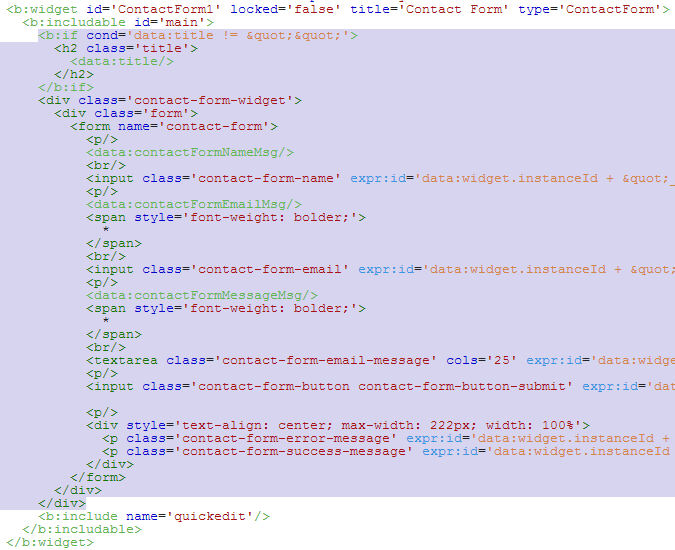
- Now Sidebar Widget will not appear.
- Click on Save Template
Now You Have done if you need any help please comments below.



 Hello, my name is Aamir khan. I'm a 24year old blogger from Pakistan.
No comments:
Post a Comment
Your feedback is always appreciated. We will try to reply to your queries as soon as time allows.
Note:
1. Make sure to click the "Subscribe By Email" link below the comment to be notified of follow up comments and replies.
2. Please "Do Not Spam" - Spam comments will be deleted immediately upon our review.
3. Please "Do Not Add Links" to the body of your comment as they will not be published.
4. Only "English" comments shall be approved.
5. If you have a problem check first the comments, maybe you will find the solution there.